
Journal & ideas · Beginner · 4 min
Record and edit a trade
Open New trade, read every labeled field on an unsaved ticket, and leave without recording unless you have a real fill.
Last source-verified . Runtime data and availability may vary.
Open this featureLearn
What this lesson is for
Create a private journal fill using your own recorded inputs.
Access: Sign-in required. Journal entries are private to your account.
Before you open it
- A modern browser with JavaScript enabled for interactive controls.
You will be able to
- Create a private journal fill using your own recorded inputs.
See
Walk through the screen
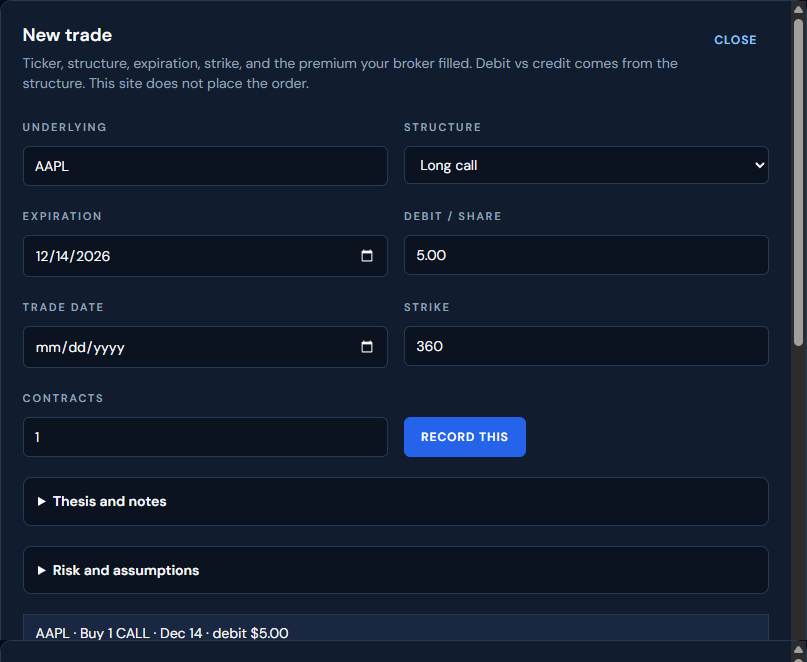
- UnderlyingThe ticker box shows AAPL in this capture.
- StructureLong call is selected. The debit or credit label follows this choice.
- ExpirationThe date field shows 12/14/2026.
- Debit / share5.00 was typed. This is the premium per share, not the whole contract.
- Trade dateLeft empty in this capture. Fill it only for a real ticket.
- Strike360 is the strike used in the worked example.
- Contracts1 contract. One contract covers 100 shares in the coach's loss figure.
- Record thisWrites a private journal row. It does not place an order. It was not clicked.
- Thesis and notesCollapsed section for the reason you are recording the decision.
- Risk and assumptionsCollapsed section. Open it before you save a real fill.
- Ticket lineReads AAPL · Buy 1 CALL · Dec 14 · debit $5.00.
- CloseLeaves the dialog. Use it when you are only inspecting the form.
Open Journal → Trade journal and select New trade.
Fill Underlying, Structure, Expiration, Trade date, and Debit / share or Credit / share as labeled for the selected structure.
Enter Strike and Contracts; enter Width when the selected structure requires it. Inspect custom legs if using a custom structure.
Expand Thesis and notes to write the reason for the decision. Check the ticket line and risk information before selecting Record this.
Use the row's edit action to correct a fill; the dialog becomes Edit fill and Save writes the change.
Open the trade detail to inspect the stored ticket. Record an actual closing premium and learning note only when the position has actually closed.
Try
Worked example
Unsaved teaching ticket captured on 2026-11-14. Record this was not clicked. These figures belong to that capture, not to a live quote.
| Underlying | AAPL |
|---|---|
| Structure | Long call |
| Expiration | 2026-12-14 |
| Debit / share | 5.00 |
| Strike | 360 |
| Contracts | 1 |
| Delayed last used by the coach | $356.27 |
| Ticket line | AAPL · Buy 1 CALL · Dec 14 · debit $5.00 |
Check the result
- Potential loss $500.00. $5.00 × 100 shares in one contract = $500.00.
- Breakeven $365.00. $360 strike + $5.00 debit = $365.00.
- Potential profit. The coach printed Unlimited for this long call.
- Probability of profit 35%. The page's own example math from delayed implied vol. The page says it is not a forecast.
Full capture note
Unsaved teaching ticket captured on 2026-11-14: Underlying AAPL, Structure Long call, Expiration 2026-12-14, Debit / share 5.00, Strike 360, Contracts 1. The ticket line read AAPL · Buy 1 CALL · Dec 14 · debit $5.00. The coach used the delayed last of $356.27 and showed potential profit Unlimited, potential loss $500.00, breakeven $365.00, and probability of profit 35%. Record this was not clicked.
Your task
Inspect the New trade dialog and identify every required input; close without saving if you have no actual fill to record.
Verify
Expected result
The coach's $500.00 loss is the $5.00 debit times 100 shares in one contract. Breakeven $365.00 is the $360 strike plus the $5.00 debit. The 35% probability line is the page's own example math from delayed implied vol, and the page says it is not a forecast. Saving would place the row under Open positions. This capture was not saved.
Common mistakes
- If the ticket line is absent, complete ticker, expiration, and strike or custom legs.
- A credit or debit label comes from the structure; check the selected structure before entering the premium.
Progress is anonymous and local to this browser. It does not sync with your account.